The Best Gaming Setups for NZ Internet Speeds

Imagine queuing up for a crucial match in your favourite online game, only to get lag-spiked out of contention because your internet couldn't keep up. For Kiwis, where most gaming servers ping from Au...
Daniel covers technology, cybersecurity, and small business topics for Lifetimes NZ. He breaks down tech news and digital trends for a general audience.
Imagine queuing up for a crucial match in your favourite online game, only to get lag-spiked out of contention because your internet couldn't keep up. For Kiwis, where most gaming servers ping from Australia, nailing the right setup means low latency over blazing speeds. This guide breaks down the best gaming setups for NZ internet speeds, tailored to our fibre plans, wireless realities, and local providers in 2026.
Understanding NZ Internet Speeds for Gaming
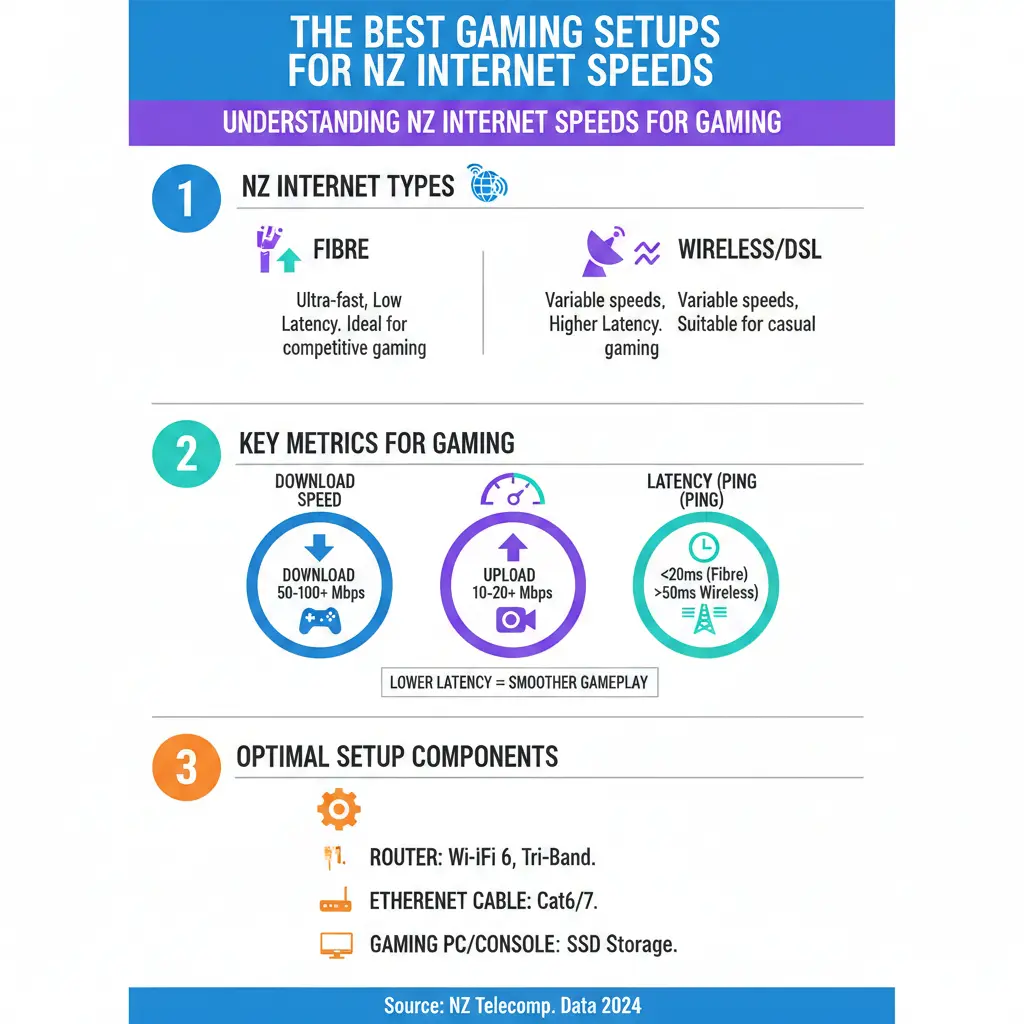
New Zealand's broadband landscape has evolved rapidly, with over 85% of homes now fibre-enabled thanks to UFB rollout. But gaming demands more than just download speeds—it's about stable ping times (under 50ms to Aussie servers) and minimal packet loss. Providers like One NZ, Spark, and Vodafone offer plans from ADSL's sluggish 4 Mbps to Fibre Max at 800 Mbps or Hyperfibre pushing gigabit territory.
For gaming, aim for at least 25-50 Mbps download, but you can scrape by on 15 Mbps if ping is low. Latency trumps bandwidth because even gigabit fibre won't save you from high ping caused by distance to servers or congestion. In rural spots, 4G/5G fixed wireless shines with low latency but variable speeds—perfect for Ultra Mobile Broadband (UMB) users.
Typical NZ Broadband Plans and Gaming Fit
- Fibre 100 (80 Mbps down): Entry-level for solo gamers—handles 1080p streaming and casual play.
- Fibre 300/500 (400 Mbps down): Ideal for households with 2-4 gamers; supports multiple 4K streams without buffering.
- Fibre 900/Hyperfibre (800+ Mbps): Beast mode for large Kiwi whānau with wired consoles and heavy downloads.
- Fixed Wireless (4G/5G): 10-100 Mbps with 20-50ms ping; great backup but fibre beats it for reliability.
Run a speed test via Speedtest.net or your provider's app to check real-world performance. One NZ notes in-home WiFi setup—like modem placement and interference—can halve your speeds.
Key Components of a Gaming Setup Optimised for NZ Speeds
The best setups prioritise wired connections, quality hardware, and smart optimisation to match our typical 20-100ms pings to Oceanic servers.
1. Router and Modem: The Heart of Low-Latency Gaming
Ditch your ISP's basic router for a gaming-grade one. Look for WiFi 6E or 7 routers with MU-MIMO and QoS (Quality of Service) to prioritise gaming traffic. TP-Link Archer or Asus ROG series handle NZ fibre plans effortlessly, supporting up to 2.5Gbps ports for Hyperfibre.
Practical tip: Place your router central, elevated, away from walls or microwaves. For One NZ users, upgrade to SuperWiFi Mesh to blanket your home in coverage—essential for larger Kiwi homes. Cost: $200-500 NZD.
2. PC or Console: Hardware That Won't Bottleneck Your Connection
For PCs, HP OMEN desktops with Intel Core i7/AMD Ryzen 7, RTX 4070+ GPUs, and 32GB RAM thrive on NZ speeds. They download 100GB patches in under 30 minutes on Fibre 500. Consoles like PS5 or Xbox Series X need Ethernet—wireless adds 10-20ms lag.
| Setup Type | Recommended Specs | NZ Speed Match | Price Range (NZD) |
|---|---|---|---|
| Budget PC | RTX 3060, 16GB RAM | Fibre 100+ | $1,500-2,500 |
| Mid-Range PC | RTX 4070, 32GB RAM | Fibre 300+ | $2,500-4,000 |
| High-End PC | RTX 5090, 64GB RAM | Hyperfibre | $4,000+ |
| Console Setup | PS5 + SSD | Any Fibre | $1,000 |
Add a 1Gbps Ethernet switch ($50) for multi-device homes—keeps everyone online without fighting for bandwidth.
3. Networking Gear: Ethernet Cables and Mesh for Reliability
Cat6 or Cat7 Ethernet cables (under 100m) deliver full fibre speeds with 1ms lower latency than WiFi. For wireless must-haves, mesh systems like One NZ SuperWiFi or Google Nest eliminate dead zones.
In 2026, WiFi 7 routers future-proof for 5Gbps+ plans, but QoS settings let you throttle Netflix hogs during raids.
4. Monitors, Peripherals, and Cooling
144Hz+ 1440p monitors (e.g., Samsung Odyssey) sync with low-ping setups for buttery gameplay. Mechanical keyboards and 8KHz polling mice reduce input lag. Ensure good airflow—NZ summers heat up rigs fast.
Optimising Your Setup for Peak NZ Performance
Even top gear flops without tweaks. Here's actionable advice:
- Wired First: Plug in via Ethernet for 50ms pings to Sydney servers.
- QoS Enable: Prioritise UDP ports for games like Fortnite or League of Legends.
- Close Bandwidth Hogs: Pause auto-updates on Steam or other devices during play.
- VPN Caution: Avoid unless routing to closer servers—most add 20ms.
- Firmware Updates: Keep router/PC software current to dodge malware slowdowns.
For rural Kiwis on 5G, position antennas skyward and test during off-peak (mornings). Providers monitor congestion, but evenings spike.
Budget Builds: Best Value Setups for Different NZ Households
Solo Gamer (Under $2,000 Total)
Prebuilt OMEN laptop, Fibre 100, basic WiFi 6 router. Handles Valorant at 144fps.
Family of Four ($3,500)
Mid-range desktop, PS5, Mesh WiFi on Fibre 300. Kids stream, you frag.
Competitive Pro ($6,000+)
Custom rig, dual monitors, Hyperfibre. Sub-30ms pings for esports.
Shop at PB Tech or JB Hi-Fi for local stock and warranties.
Common Pitfalls and NZ-Specific Fixes
Don't chase raw speed—NZ's geography means Aussie pings rule. Fixed wireless varies with tower distance; switch to fibre if available via Chorus Enablement Checker. TCF Broadband Code ensures providers fix persistent issues.
Ready to Level Up? Your Next Steps
Assess your current speeds, grab Ethernet cables, and tweak QoS today. Compare plans on Broadband Compare, then build or upgrade. With the right setup, you'll dominate lobbies despite our trans-Tasman pings. Game on, Kiwis!
Frequently Asked Questions
Sources & References
- 1
- 2
-
3
Internet Speeds for Smooth Streaming — broadbandcompare.co.nz — www.broadbandcompare.co.nz
-
4
What is the Right Internet Speed for Me? — broadbandcompare.co.nz — www.broadbandcompare.co.nz
-
5
Network Specifications Explained — modelclinics.com — modelclinics.com
-
6
Connection Speed requirements — geekzone.co.nz — www.geekzone.co.nz
-
7
Broadband Speeds Explained — mercury.co.nz — www.mercury.co.nz
-
8
The facts on broadband speed and performance — chorus.co.nz — www.chorus.co.nz
Useful Tools
Related Articles

iPad Pro: Premium Tablet for Creative Professionals
If you're a creative professional in New Zealand looking for a tablet that can handle demanding work, the iPad Pro with the M5 chip might be exactly what you need. Whether you're editing videos, desig...

Handheld Vacuum Cleaners: Quick Cleanup Solutions
Handheld vacuum cleaners have become essential tools for Kiwi households, offering quick cleanup solutions without the hassle of dragging out a full-size vacuum. Whether you're dealing with crumbs on...

French Door Refrigerators in NZ: Luxury Cooling with Style
If you're looking to upgrade your kitchen with a stylish and spacious refrigerator, a French door fridge might be exactly what you need. These elegant appliances have become increasingly popular in Ne...

Chest Freezers in New Zealand: Bulk Storage for Rural Properties
If you're living on a rural property in New Zealand, a chest freezer isn't just a convenience—it's a practical investment for storing homekill, bulk meat purchases, garden produce, and fish. Whether y...