MacBook Air M3: Lightweight Laptop for Kiwi Students

If you're a Kiwi student looking for a powerful yet portable laptop that won't weigh you down during those long commutes between lectures, the MacBook Air M3 might be exactly what you need. Released i...
The Lifetimes NZ editorial team curates, fact-checks, and updates guides on personal finance, property, health, immigration, legal, business, and lifestyle topics relevant to Lifetimes NZ readers. Articles are produced with AI assistance and reviewed by the editorial team before publication.
If you're a Kiwi student looking for a powerful yet portable laptop that won't weigh you down during those long commutes between lectures, the MacBook Air M3 might be exactly what you need. Released in 2024, this sleek device combines impressive performance with all-day battery life, making it a solid choice for study, creative work, and everyday tasks. Whether you're juggling assignments, video projects, or just need something that'll last through a full day on campus, we'll break down what makes the M3 special and whether it's worth your money.
What Makes the MacBook Air M3 Stand Out?
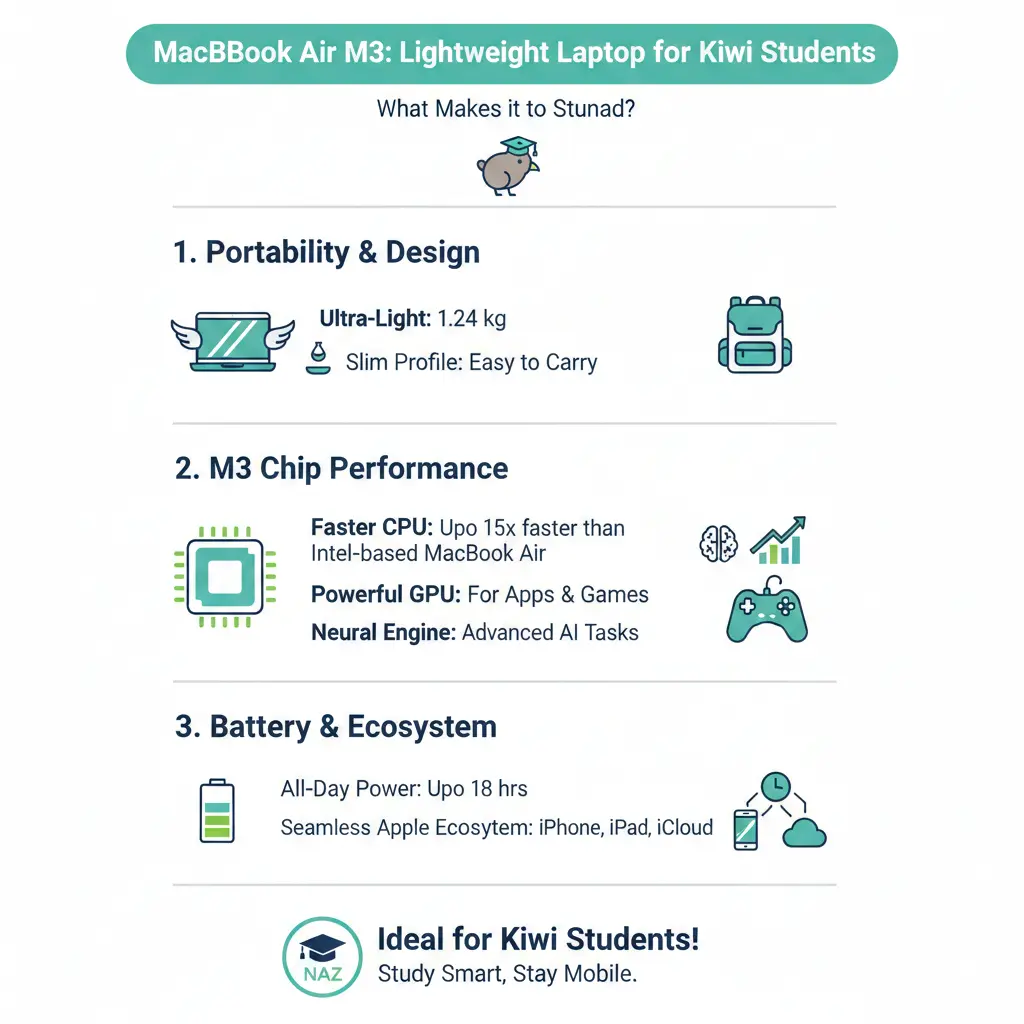
The MacBook Air M3 is built on Apple's latest 3nm chip technology, which delivers noticeably better performance and energy efficiency compared to earlier models. The base M3 chip features an 8-core CPU with 4 performance cores and 4 efficiency cores, paired with an 8-core GPU that you can upgrade to a 10-core GPU for more demanding tasks. This means you're getting genuine power in a package that weighs less than 1.5kg for the 13-inch model.
One of the biggest improvements over the previous M2 generation is the jump in GPU performance. The M3 delivers approximately 15% better graphics performance than the M2, thanks to a new GPU architecture with dynamic caching and hardware-accelerated ray tracing. For Kiwi students studying design, video production, or animation, this translates to smoother editing and faster rendering times.
Battery Life That Actually Lasts
The M3 MacBook Air offers up to 18 hours of battery life, which means you can realistically get through a full day of university without hunting for a power socket. This is particularly useful if you're studying at libraries across Auckland, Wellington, or Christchurch campuses where outlets aren't always convenient. The fanless design keeps things quiet during lectures too—no annoying fan noise to distract you or your classmates.
Display and Design: Built for Studying
The 13.6-inch Liquid Retina display features a native resolution of 2560 by 1664 pixels with support for 1 billion colours. At 500 nits brightness, the screen is crisp and readable even in bright sunlight, which is handy when you're working outdoors during our New Zealand summers. The True Tone technology automatically adjusts the display colour temperature based on your environment, reducing eye strain during those late-night study sessions.
The physical design is equally impressive—the MacBook Air is less than half an inch thin and weighs around 1.24kg for the 13-inch model, making it genuinely portable for students who move between different campuses or study locations. The aluminium unibody construction feels premium and durable, which matters when you're carrying it in a backpack daily.
Connectivity and Ports
The M3 MacBook Air includes two Thunderbolt/USB 4 ports that support charging, DisplayPort, and data transfer at up to 40Gb/s. You also get a 3.5mm headphone jack, which is surprisingly useful if you prefer wired headphones or need to connect to older audio equipment in university studios. The inclusion of Wi-Fi 6E (802.11ax) ensures faster and more reliable wireless connections across university networks, compared to the older Wi-Fi 6 in the M2 model.
A unique feature for the M3 is support for two external displays—close the MacBook lid and you can connect a 5K display alongside your main workspace. This is brilliant if you're setting up a study station in your flat or using university computer labs with multiple monitors.
Performance Comparison: M3 vs M2
Testing has shown the M3 delivers approximately 20% better overall performance compared to the M2 generation. For most Kiwi students, this means faster app launches, smoother multitasking, and quicker compilation times if you're studying computer science or engineering. The base storage has also improved significantly—the M3's 256GB SSD reads at 2,740MB/s compared to just 1,158MB/s on the M2, making file transfers and app installations noticeably snappier.
The M3 also includes a 16-core Neural Engine with enhanced AI capabilities, which Apple is positioning as part of its "Apple Intelligence" features. While these AI features are still rolling out, they'll become increasingly useful for tasks like writing assistance and image processing throughout 2026.
Memory and Storage Options
The M3 MacBook Air now comes standard with 16GB of unified memory, which is a meaningful upgrade from older entry-level models. You can configure it up to 24GB if you're doing heavy video editing, 3D rendering, or running multiple applications simultaneously. Storage starts at 256GB and goes up to 2TB, so you can choose based on whether you're storing large video projects or keeping things minimal with cloud storage through OneDrive or Google Drive.
Is It Right for Kiwi Students?
The MacBook Air M3 is an excellent choice if you're:
- Studying creative fields like design, video production, or photography
- Pursuing computer science or engineering with coding work
- Needing a reliable laptop for general study, research, and assignments
- Valuing portability and all-day battery life over maximum power
- Planning to keep your laptop for several years (Apple's build quality is strong)
If you're on a tight budget, consider that the M2 is still perfectly capable for most university work, and you might find older stock at a discount. However, if you're investing in a laptop for your entire degree, the M3's improvements in performance, battery life, and display support are worth the extra cost.
Pricing and Where to Buy in New Zealand
The MacBook Air M3 is available through Apple's official New Zealand store, as well as major retailers like JB Hi-Fi, Noel Leeming, and The Warehouse. Prices typically start around NZ$1,499 for the base 13-inch model with 256GB storage. Many retailers offer interest-free payment plans, which can help spread the cost if you're managing a student budget. Check whether your university offers any staff or student discounts—some institutions have partnerships with Apple that can save you 5-10%.
Final Thoughts
The MacBook Air M3 is a genuinely excellent laptop for Kiwi students who want performance, portability, and reliability without breaking the bank compared to the Pro models. It's lightweight enough to carry between campuses, powerful enough to handle creative and technical work, and built to last through your entire degree and beyond. Whether you're in your first year at university or finishing up your final projects, the M3 delivers the right balance of power and practicality for modern student life in New Zealand.
If you're ready to make the investment, start by checking what discounts your university or polytechnic might offer, then head to your nearest Apple retailer or visit the official Apple New Zealand store to try one out in person. Your study sessions will thank you for the upgrade.
Frequently Asked Questions
Sources & References
-
1
MacBook Air (13-inch, M3, 2024) - Tech Specs — Apple Support — support.apple.com
- 2
-
3
13-inch MacBook Air M3 chip — Cavalier Computers — www.cavaliercomputers.com
Useful Tools
Related Articles
Portable Washing Machines: Compact Solutions for Studio Apartments
I appreciate the detailed request, but I need to be transparent about a significant limitation with the search results provided.

iPad Pro: Premium Tablet for Creative Professionals
If you're a creative professional in New Zealand looking for a tablet that can handle demanding work, the iPad Pro with the M5 chip might be exactly what you need. Whether you're editing videos, desig...
Handheld Vacuum Cleaners: Quick Cleanup Solutions
Handheld vacuum cleaners have become essential tools for Kiwi households, offering quick cleanup solutions without the hassle of dragging out a full-size vacuum. Whether you're dealing with crumbs on...

French Door Refrigerators in NZ: Luxury Cooling with Style
If you're looking to upgrade your kitchen with a stylish and spacious refrigerator, a French door fridge might be exactly what you need. These elegant appliances have become increasingly popular in Ne...